Configuring referral types
Referral types allow you to categorize your referrals for query and reporting. The referral types appear when creating referrals (see Initiating referrals)
When a referral is created using the “Medical Imaging” referral type, the referral appears in the Medical Imaging section on the Investigation tab on the patient's medical summary.
Steps
| 1. | On the Wolf EMR home tab, click Configuration  . . |
| 2. | From the View menu, choose Physicians /Service Providers > Referral Types. The Referral Types Maintenance window opens. |
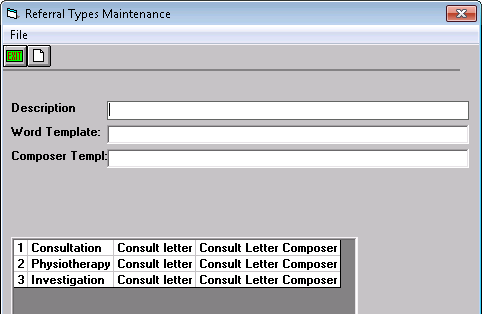
| 3. | To add a new referral type, click the new button  in the upper-left corner and type a description and an abbreviation. in the upper-left corner and type a description and an abbreviation. |
| Field | Description |
|---|---|
|
Description |
Enter the name of the referral type. Tip: To use Quick Referrals, these five referral types must exist (see Managing sent referrals) Consultation Physiotherapy Medical Imaging Massage Therapy Podiatry |
|
Word Template |
Specify the default letter template to use when creating the referral letter using a SMART form-based letter. |
|
Composer Templ |
Specify the default letter template to use when creating the referral letter using the Referral Letter Composer. |
| 4. | To edit a type, click it in the list and change its information. |
| 5. | To delete a type, click it in the list and from the File menu, click Delete. |
© 2018 