Configuring patient portal registration rules
You can set patient registration rules for the patient portal. Registration rules include:
The minimum age a patient must be to register for the patient portal.
The age of consent: Determines at what age a patient must consent (by signing a consent form) to enable another individual to view their health information on the patient portal. For example, if a mother has access to her son’s health information, she can no longer access his health information when he reaches the age of consent, unless he signs a consent form. For more information, see Giving other people access to a patient’s data.
Steps
| 1. | On the Wolf EMR Home page, click the Maintenance tab. |
| 2. | In the Patient Portal area, click Configure Web Content  . The Patient Portal Content and Configuration Form window opens. . The Patient Portal Content and Configuration Form window opens. |
| 3. | In the left pane, choose Registration Configuration > Registration Rules. |
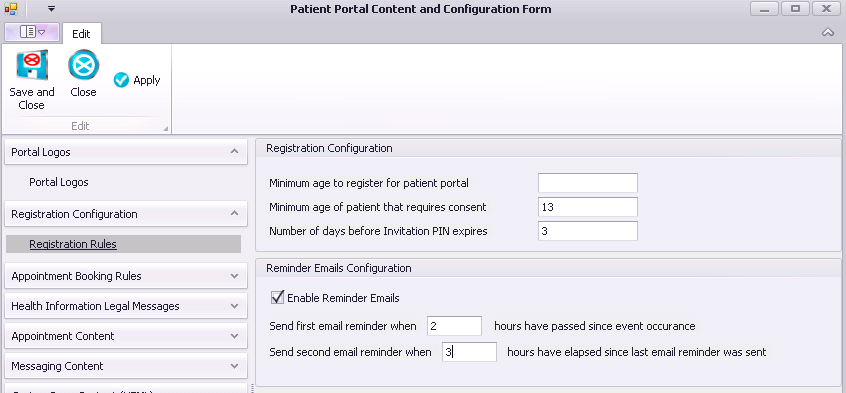
| 4. | Use the following table to enter information in the Registration Configuration area: |
| Field | Description |
|---|---|
|
Minimum age to register for patient portal |
Enter the minimum registration age in years. If you do not want to set an age restriction, then leave the field blank. |
|
Minimum age of patient that requires consent |
Enter the age of consent in years. |
|
Number of days before invitation PIN expires |
Enter the number of days a patient’s registration PIN is valid. |
|
Enable Reminder Emails |
Select to send a reminder email when a patient was invited to register for the patient portal but has not yet registered. |
|
Send first/second email reminder… |
Enter how long after the initial invitation to send the first and second reminder. We recommend 25 hours. |
| 5. | Perform one of the following actions: |
To apply your changes to the patient portal and leave the window open, click Apply .
.
To apply your changes to the patient portal and close the window, click Save and Close .
.
To close the window without saving your changes, click Close .
.
© 2018 